Make talent quality your leading analytic with skills-based hiring solution.
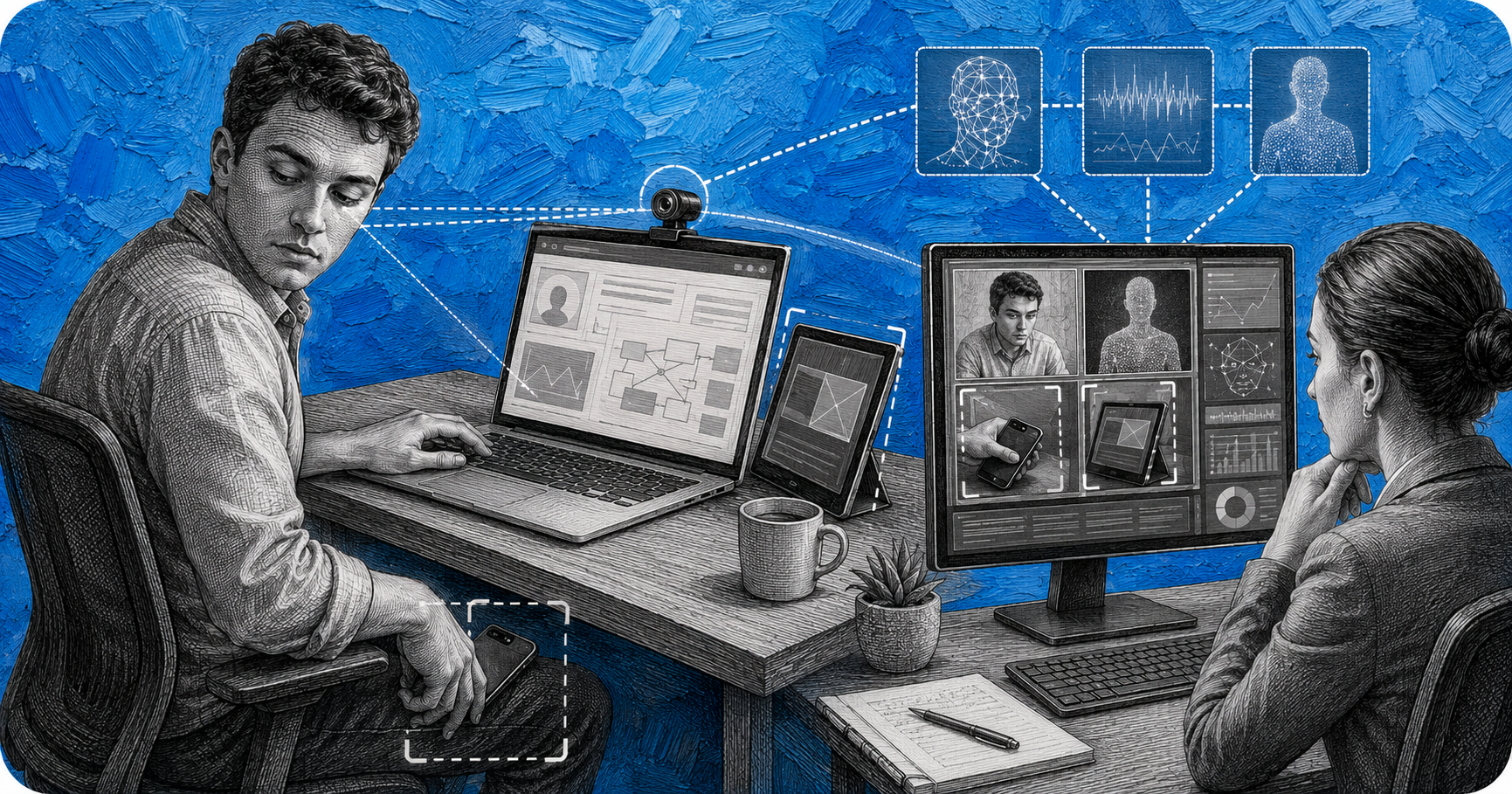
Second device cheating is when a candidate uses a phone, tablet, or second monitor outside the webcam’s view during a proctored online assessment to look up answers, message someone for help, or mirror their screen to a helper. It is one of the hardest forms of assessment fraud to stop with software alone, because the browser lockdown running on the candidate’s laptop has no way to see a device sitting next to it. Modern AI proctoring closes that gap with a combination of multi angle camera capture, object detection, screen and session analysis, and gaze and audio anomaly detection working together.
For hiring teams, this matters more than it might seem. A skills assessment or technical interview is often the only objective signal a recruiter has before making a decision, and secondary device use for candidate fraud in online proctoring quietly breaks that signal. Understanding exactly how the cheating happens, and exactly how modern proctoring platforms catch it, is the difference between trusting an assessment score and second guessing it.
Second device cheating covers any use of a device beyond the one running the assessment itself. In practice this shows up a handful of ways:
This is distinct from the kind of cheating covered in ChatGPT interview cheating, where a candidate uses AI tools directly on the interview device during a live conversation. Second device cheating is a hardware problem as much as a software one: the candidate deliberately keeps a second piece of equipment outside the frame the assessment platform can see.
Candidates who plan for second device cheating usually rehearse the setup in advance. According to Testinvite’s research on online exam cheating methods, a common pattern is placing a phone on the lap below the webcam to search Google, ChatGPT, or messaging apps, or angling the phone behind the laptop to read answers off the screen without it entering frame. Honorlock’s research on cell phone detection adds photographing exam or assessment questions and sending them to a tutor or friend for real time answers, using homework and answer sharing apps, and even communicating through a smartwatch paired to a hidden phone.
A second monitor or laptop introduces a different risk: it lets a candidate keep the visible screen clean while running a browser, an AI assistant, or a remote desktop connection somewhere the camera never reaches. Proctoring architecture research from Forasoft describes this as the dominant cheating vector in 2026, precisely because a single front facing webcam simply does not see it.
A lockdown browser can only control the device it is installed on. It can block new tabs, disable copy and paste, and stop the candidate from opening other applications on the assessment laptop itself, but it has no visibility into a phone sitting six inches to the left of the keyboard. Proctortrack’s analysis of second screen cheating makes this limitation explicit: lockdown technology “cannot monitor what happens on nearby devices or outside the screen,” which is exactly why proctoring vendors have shifted toward layered, camera and behavior based detection rather than relying on the lockdown browser alone.
Catching second device cheating requires several detection layers working together, since no single signal is reliable on its own.
Many proctoring setups now ask the candidate to use their own phone as a second, side angle camera pointed at the desk, hands, and the sides of the laptop, in addition to the primary webcam. Honorlock calls this second camera monitoring, and Talview describes the same approach as dual camera monitoring, where the phone “captures the workspace and detecting out of view activity” that the main webcam would otherwise miss entirely.
Computer vision models trained to recognize phones, tablets, second laptops, and paper notes scan the video feed frame by frame. Forasoft’s proctoring architecture research describes running “a YOLO class detector on every Nth frame” specifically to catch these objects the moment they enter view, even when they are only partially visible or reflective. Talview’s detection systems similarly look for “device shapes, reflective surfaces, or lit screens” that suggest a hidden device is active nearby.
Beyond the camera feed, proctoring platforms analyze what is happening on the assessment session itself: sudden pastes of long answer blocks with no typing beforehand, unexpected network connections, or the same device appearing across two different candidate sessions. Forasoft notes that flagging “a paste of hundreds of tokens with no preceding typing” on a coding assessment is one of the more reliable signals of outside help, whether that help came from a second device or a second person.
Rather than flagging every glance away from the screen, modern gaze tracking looks for a change in pattern. Forasoft’s research gives a useful example: a candidate who has been stable for ten minutes and then suddenly develops a five second downward look every thirty seconds is a much stronger signal than a single glance. Testinvite describes the same underlying behavior as AI proctoring analyzing “repeated downward glances toward the lap,” which is the classic posture of someone reading a phone screen resting below the desk line.
Microphones pick up what cameras miss. Talview’s audio intelligence layer listens for “vibrations, whispering, and phone notification cues” during a session. Honorlock’s smart voice detection goes further, listening for the specific wake phrases that trigger voice assistants, such as “Hey Siri,” “Alexa,” or “OK Google,” since a candidate saying those phrases is very likely reaching for a hidden device. Forasoft’s research describes a related technique called speaker diarization, which separates distinct voices in the audio feed and flags a session the moment “a second voice appears for longer than a threshold,” a strong indicator that someone off camera is coaching the candidate in real time.
A single flagged frame or glance rarely results in an automatic disqualification. Most platforms, including Glider’s AI proctoring, route flagged moments to a human reviewer who checks the underlying video, audio, and session evidence before any integrity decision is made. This layered approach matters for accuracy: Forasoft’s case study on a custom proctoring build found that combining automated detection with human review raised the verified cheating catch rate from 12 percent to 30 percent, while cutting false positive complaints by 64 percent. That combination of AI plus human judgment, described in more depth in AI proctoring vs human proctoring, is what keeps detection accurate without punishing honest candidates for an odd camera angle or a barking dog.
Second device cheating rarely happens in isolation either. Candidates who plan to use a hidden phone during an assessment are often the same candidates worth a closer look during identity verification, which is why hiring teams increasingly pair proctoring with tools like Glider’s ID verification to build a full picture of candidate authenticity rather than relying on a single checkpoint.
Device related violations are not a fringe issue. Forasoft’s review of 2025 UK exam misconduct data found that device related violations accounted for 44.3 percent of all recorded misconduct cases, a total of 2,225 incidents in a single reporting period. That single statistic captures why proctoring vendors have invested so heavily in multi camera capture and object detection specifically: a hidden phone or second screen is not one cheating method among many, it is close to the single largest category of proctoring violations recorded.
Second device cheating is one entry in a much longer list of tactics candidates try during proctored assessments; the fuller picture is covered in how candidates cheat in hiring assessments.
Second device cheating is when a candidate uses a phone, tablet, second monitor, or second laptop outside the view of the assessment webcam to look up answers, get messaged help, or mirror the assessment screen to another person during a proctored test or interview.
Yes. AI proctoring platforms combine object detection on the video feed, screen and session analysis (such as unexpected pastes or network connections), and behavioral signals like sudden gaze pattern changes to flag when a candidate appears to be using a second monitor or screen outside the camera’s view.
Detection typically layers several signals: object detection models that recognize phone shapes and lit or reflective screens entering the video frame, a secondary phone or side angle camera capturing the desk and hands, gaze tracking that flags repeated downward glances, and audio analysis that picks up phone vibrations, notification sounds, or voice assistant wake phrases.
No, not on its own. A lockdown browser only controls the device it is installed on and cannot see or restrict a separate phone, tablet, or monitor sitting nearby. That is why proctoring vendors pair lockdown browsers with camera based and behavioral detection rather than relying on the browser alone.
Platforms look for the indirect signals of screen mirroring rather than the mirroring app itself: unusual network activity, a second voice appearing in the audio feed (speaker diarization), or behavior patterns consistent with someone reading instructions from off screen. Combined with a required second camera angle, these signals make live screen mirroring to a helper significantly harder to hide.
Accuracy improves substantially when AI detection is paired with human review rather than used alone. Industry case study data shows verified cheating catch rates roughly doubling, and false positive complaints dropping sharply, once flagged incidents are reviewed by a person before any action is taken, which is the model most reputable AI proctoring platforms now follow.

Contingent worker identity verification is the practice of confirming that a freelancer, contractor, or gig worker is who they claim to be before they are onboarded, not just screened on paper. Most companies apply this scrutiny to full time employees and skip or shortcut it for contingent talent, which is exactly the gap fraud actors […]

A structured interview scorecard is a standardized form that lists the specific competencies a role requires, gives every interviewer the same rating scale to judge candidate answers against, and forces a written justification for each score. It exists to replace gut feeling with evidence, so five interviewers evaluating the same candidate land on comparable, defensible […]

Most employers now say they practice skills based hiring, and most job postings have quietly dropped the “bachelor’s degree required” line. But the data on actual hires tells a different story. Across multiple 2026 analyses, the share of new hires who are non degreed candidates has barely moved, even at companies that formally removed degree […]